Rules
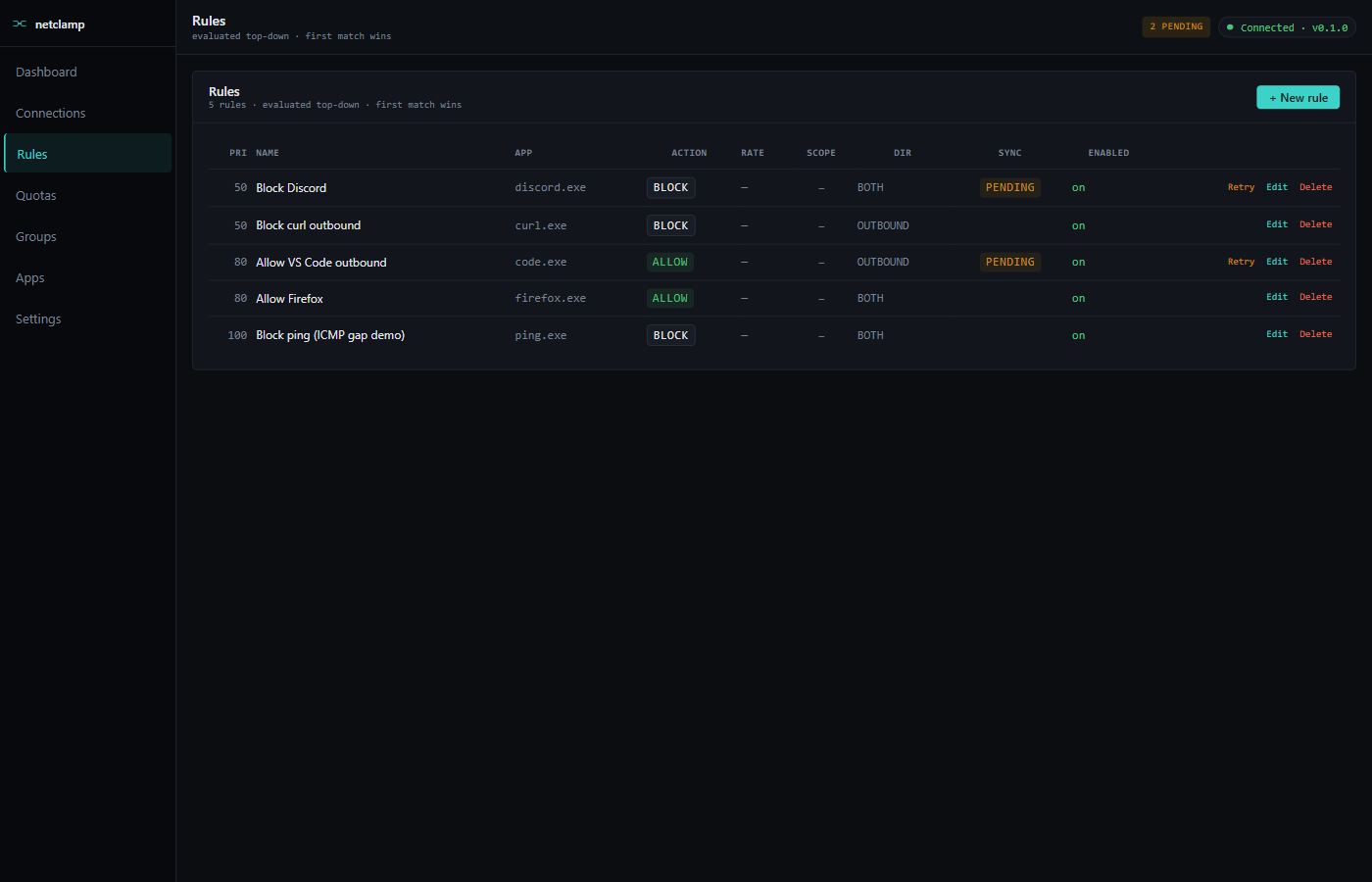
Rules are the core of NetClamp. Each rule pairs a match target with
an action: BLOCK, ALLOW, or RATE_LIMIT. Rules are evaluated
top-down, first match wins.
Anatomy of a rule
Name |
Free-text. Shows up in logs and the row list. Pick something descriptive — "Block Slack on weekends" beats "rule 7". |
Match target |
What the rule applies to. Four options below. |
Action |
|
Direction |
|
Priority |
Integer. Lower number = checked first. Default 100. Use this when two rules could match the same flow. |
Enabled |
Toggle. Disabled rules don’t sync to WFP. |
The Advanced section adds Remote address (CIDR), Remote port, and
Protocol (Any/TCP/UDP).
Match targets
| Target | What it matches |
|---|---|
App by path |
Exact filesystem path. The most common choice. Use
|
Same app at any path |
Match the executable file name regardless of directory. Useful
when an app gets reinstalled or shimmed ( |
Windows Service |
Match traffic from a service by service name (e.g. |
Microsoft Store App |
Match by Store package family name. Necessary because Store apps run from sandboxed paths that change between updates. |
Actions
BLOCK
Drops the flow at connect-time. The app sees its connect() /
bind() call fail with an OS-level error (Windows reports
WSAECONNREFUSED / WSAENETUNREACH depending on the layer). No
retry — the WFP filter survives until you delete the rule.
ALLOW
Explicit allow. Useful in combination with a default-block policy:
"block outbound by default, but allow Firefox to talk to anything."
On a stock install (default-allow outbound, default-block inbound) an
ALLOW BOTH OUTBOUND rule is redundant — the default policy already
permits it.
RATE_LIMIT
Cap throughput. Requires at least one of:
-
rate_limit_down_bytes_per_sec(server → client) -
rate_limit_up_bytes_per_sec(client → server)
If the kernel driver is loaded (kdrv_active: true in /api/v1/status)
the cap is enforced at packet level with ~1% accuracy. Without the
driver, NetClamp falls back to a userspace hysteresis shaper: the
service watches throughput and toggles the rule between ALLOW and a
short-window BLOCK to keep the average near the target. Coarser, but
no kernel driver needed.
Rate units in the SPA: KB/s (kilobytes, base 1024). The wire field
is bytes-per-second.
Priority and ordering
Rules are sorted by priority ascending then by id ascending, then
evaluated top-down. First match wins. Once a flow hits a matching
rule, no later rules see it.
Typical layering:
-
priority=10—BLOCKrules for known-bad domains/IPs across all apps -
priority=50—RATE_LIMITrules for chatty apps -
priority=100— per-appALLOWwhitelists
If you have a BLOCK rule at priority 100 and an ALLOW rule at
priority 50, the ALLOW wins.
Advanced: narrowing by remote / protocol
Remote address |
CIDR. |
Remote port |
TCP/UDP port. |
Protocol |
|
Sync state
After you save, the rule’s sync_state should reach synced within a
few seconds. Other states:
-
pending_create/pending_update/pending_delete— worker is mid-reconcile; will resolve within ~2s. -
broken— WFP rejected the filter. Click Retry on the row to re-attempt; if it still fails the troubleshooting page has the diagnostic flow.
If a rule stays in pending_* or hits broken, click Retry on the
row; if that doesn’t help, see
Troubleshooting.
Editing and deleting
-
Edit opens the same form pre-filled with the current values. Save triggers a
PUT /api/v1/rules/{id}which atomically updates the store row AND the WFP filter. -
Delete removes the rule. Worker tears down the WFP filter; the store row stays at
pending_deleteuntil WFP confirms, then it’s removed.